1. 引言
这篇文章萌叔来谈谈MCP的协议的一些重要概念,以及它是如何和大模型进行交互的。
2. MCP架构
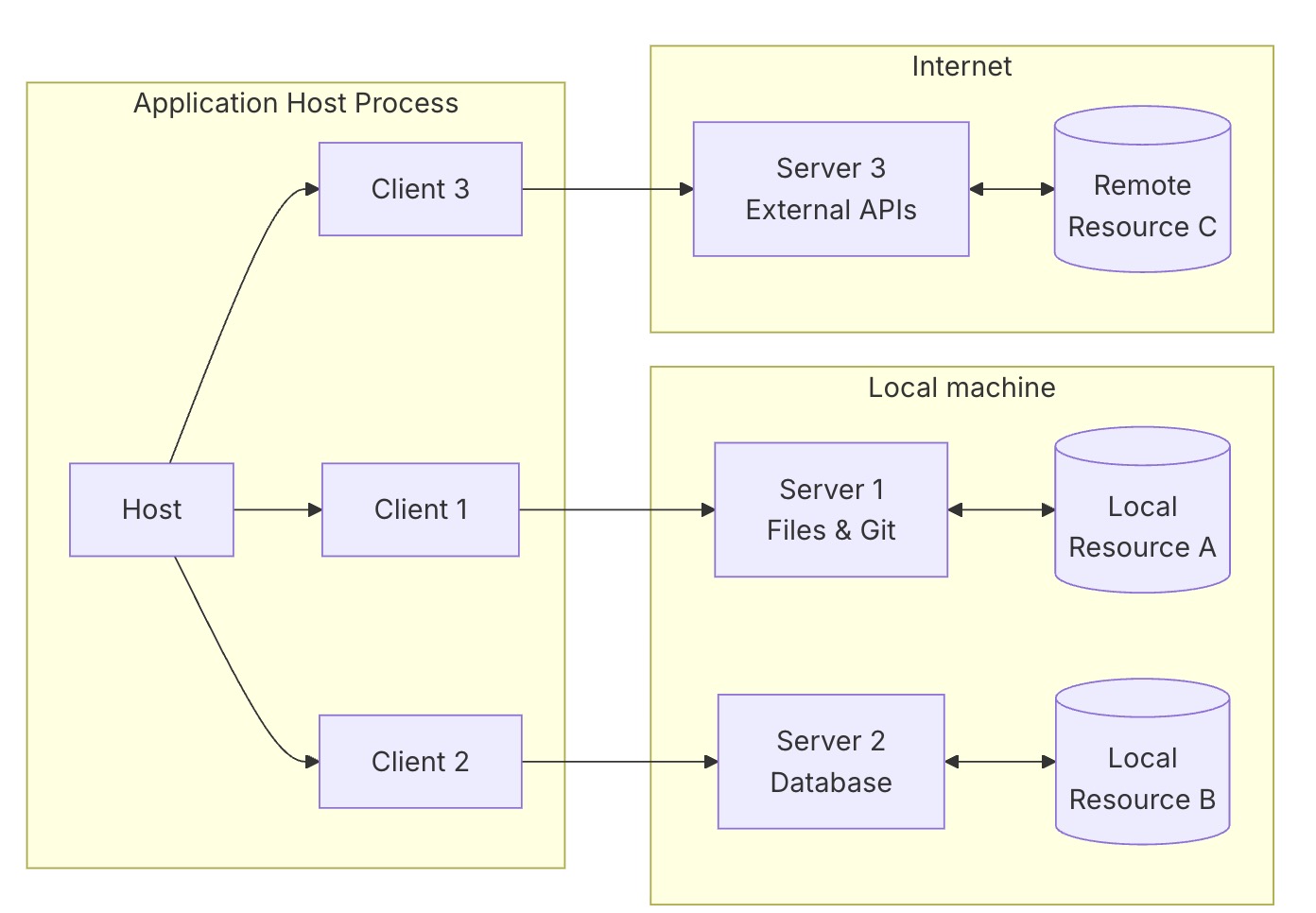
2.1 Host
Host进程充当容器和协调器,它要负责启动MCP-Client,使用Client与对应的MCP-Server进行交互。
通常而言Host with Client就是第一个AI Agent,在其中必然会涉及与大模型的交互。
2.2 Client
Client由Host创建,每个Client与特定的Server具有一对一的关系
2.3 Server
通过 MCP 原语暴露resource、tool和prompt, Server可以运行在本地或者是远程服务
3. MCP协议的内容
MCP协议的核心诉求是对外说明Server具有什么能力,Client该如何使用这种能力,每种能力其实都被抽象成了某个tool,类似于函数。
为了更好的使用tool,MCP引入了resource和prompt,
3.1 resource
resource一般是可访问的静态或动态数据源,笔者的理解,resource是领域相关的知识库
3.2 prompt
用户或系统提供给模型的指令或上下文输入,用于引导模型行为。
大部分情况下,只提供tool即可,注意: 一个server通过会提供多个tool。
Client和Server采用JSON-RPC 2.0协议。
3.3 Client要获取tool信息通常会发起 ListTools 指令
Request
{
	"method": "tools/list",
	"params": {
		"_meta": {
			"progressToken": 3
		}
	},
	"jsonrpc": "2.0",
	"id": 3
}
Response
{
	"jsonrpc": "2.0",
	"id": 3,
	"result": {
		"tools": [{
			"name": "remember",
			"description": "Retrieve historical chat records between users and LLM.",
			"inputSchema": {
				"properties": {
					"keyword": {
						"description": "key word",
						"title": "Keyword",
						"type": "string"
					},
					"start_date": {
						"anyOf": [{
							"type": "string"
						}, {
							"type": "null"
						}],
						"default": null,
						"description": "Start date in 'YYYYMMDD' format.When empty, automatically uses the date 3 months before today",
						"examples": ["20250620"],
						"title": "Start Date"
					},
					"end_date": {
						"anyOf": [{
							"type": "string"
						}, {
							"type": "null"
						}],
						"default": null,
						"description": "End date in 'YYYYMMDD' format.When empty, automatically uses today's date",
						"examples": ["20250710"],
						"title": "End Date"
					},
					"max_message_count": {
						"default": 200,
						"description": "The maximum number of messages that can be returned",
						"minimum": 1,
						"title": "Max Message Count",
						"type": "integer"
					}
				},
				"required": ["keyword"],
				"type": "object"
			},
			"outputSchema": {
				"properties": {
					"result": {
						"title": "Result",
						"type": "string"
					}
				},
				"required": ["result"],
				"title": "_WrappedResult",
				"type": "object",
				"x-fastmcp-wrap-result": true
			}
		}]
	}
}
3.4 Client使用某个tool时,会使用 callTool 指令
Request
{
	"jsonrpc": "2.0",
	"method": "tools/call",
	"id": "tool-call-1754015372815",
	"params": {
		"name": "get_datetime",
		"arguments": {
			"format": "date_jp"
		},
		"_meta": {
			"progressToken": 0
		}
	}
}
Response
{
	"jsonrpc": "2.0",
	"id": "tool-call-1754015372815",
	"result": {
		"content": [{
			"type": "text",
			"text": "2025年08月01日"
		}],
		"isError": false
	}
}
4.与大模型的交互
我们已经通过MCP协议获知了MCP Server所能提供的能力,现在需要把这些信息告诉大模型, 让大模型依据上下文以及MCP Server提供的能力,做出决策,发出指令。
下面我们以 daodao97/chatmcp 为示例,看看与大模型的交互过程
{
"model": "deepseek-chat",
"messages": [{
"role": "system",
"content": "You are an intelligent and helpful AI assistant. Please:\n1.Provide clear and concise responses\n2.If you're not sure about something, please say so\n3.When appropriate, provide examples to illustrate your points\n4.If a user messages you in a specific language, respond in that language\n5.Format responses using markdown when helpful\n6.Use mermaid to generate diagrams\n7.NOTICE: Before starting new conversation, try to get the current time(IMPORTANT)\n<system_prompt>\nYou will select appropriate tools and call them to solve user queries\n\n**CRITICAL CONSTRAINT: You MUST call only ONE tool per response. Never call multiple tools simultaneously.**\n</system_prompt>\n\nLanguage: zh\n**Tool Definitions:**\nHere are the functions available, described in JSONSchema format:\n<tool_definitions>\n[\n {\n \"name\": \"get_datetime\",\n \"description\": \"Get current date and time in various formats\",\n \"inputSchema\": {\n \"type\": \"object\",\n \"properties\": {\n \"format\": {\n \"type\": \"string\",\n \"description\": \"\\nAvailable formats:\\n- date: 2024-12-10\\n- date_slash: 2024/12/10\\n- date_jp: 2024年12月10日\\n- datetime: 2024-12-10 00:54:01\\n- datetime_jp: 2024年12月10日 00時54分01秒\\n- datetime_t: 2024-12-10T00:54:01\\n- compact: 20241210005401\\n- compact_date: 20241210\\n- compact_time: 005401\\n- filename_md: 20241210005401.md\\n- filename_txt: 20241210005401.txt\\n- filename_log: 20241210005401.log\\n- iso: 2024-12-10T00:54:01+0900\\n- iso_basic: 20241210T005401+0900\\n- log: 2024-12-10 00:54:01.123456\\n- log_compact: 20241210_005401\\n- time: 00:54:01\\n- time_jp: 00時54分01秒\\n\"\n }\n },\n \"required\": [\n \"format\"\n ]\n }\n }\n]\n</tool_definitions>\n<tool_usage_instructions>\nTOOL USE\n\nYou have access to a set of tools that are executed upon the user's approval. You can use one tool per message, and will receive the result of that tool use in the user's response. You use tools step-by-step to accomplish a given task, with each tool use informed by the result of the previous tool use.\n\n# Tool Use Formatting\n\nTool use is formatted using XML-style tags. The tool name is enclosed in opening and closing tags, and parameters must be provided in JSON format. Here's the structure:\n\n<function name=\"{tool_name}\">\n{\n \"parameter1_name\": \"value1\",\n \"parameter2_name\": \"value2\"\n}\n</function>\n\nFor example:\n\n<function name=\"read_file\">\n{\n \"path\": \"src/main.js\"\n}\n</function>\n\nAlways adhere to this format for the tool use to ensure proper parsing and execution.\n</tool_usage_instructions>"
}, {
"role": "user",
"content": [{
"type": "text",
"text": "今天几号"
}]
}, {
"role": "assistant",
"content": "<function name=\"get_datetime\">\n{\n \"format\": \"date_jp\"\n}\n</function>"
}, {
"role": "user",
"content": "tool result: get_datetime\n[{type: text, text: 2025年08月01日}]\n"
}, {
"role": "assistant",
"content": "今天是2025年8月1日。"
}, {
"role": "user",
"content": [{
"type": "text",
"text": "明天是几号?"
}]
}, {
"role": "assistant",
"content": "<function name=\"get_datetime\">\n{\n \"format\": \"date_jp\"\n}\n</function>"
}, {
"role": "user",
"content": "tool result: get_datetime\n[{type: text, text: 2025年08月01日}]\n"
}],
"stream": true,
"temperature": 1.0,
"top_p": 1.0
}
第一条消息比较大,我们格式化一下
You are an intelligent and helpful AI assistant. Please:
1.Provide clear and concise responses
2.If you're not sure about something, please say so
3.When appropriate, provide examples to illustrate your points
4.If a user messages you in a specific language, respond in that language
5.Format responses using markdown when helpful
6.Use mermaid to generate diagrams
7.NOTICE: Before starting new conversation, try to get the current time(IMPORTANT)
<system_prompt>
You will select appropriate tools and call them to solve user queries
**CRITICAL CONSTRAINT: You MUST call only ONE tool per response. Never call multiple tools simultaneously.**
</system_prompt>
Language: zh
**Tool Definitions:**
Here are the functions available, described in JSONSchema format:
<tool_definitions>
[
{
"name": "get_datetime",
"description": "Get current date and time in various formats",
"inputSchema": {
"type": "object",
"properties": {
"format": {
"type": "string",
"description": "\nAvailable formats:\n- date: 2024-12-10\n- date_slash: 2024/12/10\n- date_jp: 2024年12月10日\n- datetime: 2024-12-10 00:54:01\n- datetime_jp: 2024年12月10日 00時54分01秒\n- datetime_t: 2024-12-10T00:54:01\n- compact: 20241210005401\n- compact_date: 20241210\n- compact_time: 005401\n- filename_md: 20241210005401.md\n- filename_txt: 20241210005401.txt\n- filename_log: 20241210005401.log\n- iso: 2024-12-10T00:54:01+0900\n- iso_basic: 20241210T005401+0900\n- log: 2024-12-10 00:54:01.123456\n- log_compact: 20241210_005401\n- time: 00:54:01\n- time_jp: 00時54分01秒\n"
}
},
"required": [
"format"
]
}
}
]
</tool_definitions>
<tool_usage_instructions>
TOOL USE
You have access to a set of tools that are executed upon the user's approval. You can use one tool per message, and will receive the result of that tool use in the user's response. You use tools step-by-step to accomplish a given task, with each tool use informed by the result of the previous tool use.
# Tool Use Formatting
Tool use is formatted using XML-style tags. The tool name is enclosed in opening and closing tags, and parameters must be provided in JSON format. Here's the structure:
<function name="{tool_name}">
{
"parameter1_name": "value1",
"parameter2_name": "value2"
}
</function>
For example:
<function name="read_file">
{
"path": "src/main.js"
}
</function>
Always adhere to this format for the tool use to ensure proper parsing and execution.
</tool_usage_instructions>
tool的定义信息是通过messages传递,而没有使用OpenAI API提供的tools参数, 这种做法可能是为了在多种LLM保持兼容。- tool定义使用了特殊的XML标签
<tool_definitions>,指令下发使用了XML标签<function> - 最后还是要强调,LLM只能做出决策,
callTool是由Host发起的,tool的执行结果稍后也通过messages传递给LLM
为什么建议LLM一次只发出一条callTool指令
细心的读者可能会发现
CRITICAL CONSTRAINT: You MUST call only ONE tool per response. Never call multiple tools simultaneously.
这是因为很多情况下,后一个tool的入参可能会依赖前一个tool的执行结果, 针对这种情况,大模型容易处理错误。最简单的方式就是一次只执行一条指令。
示例
假定我有一个音乐MCP,提供了search_music和play_music
Q: 请为我播放周杰伦的《稻香》?
显然需要获得
- 1)使用
search_music获取音乐文件的URL(存在无法获取到的情况) - 2)如果step 1获取到了URL,使用
play_music播放音乐
5. 时序图
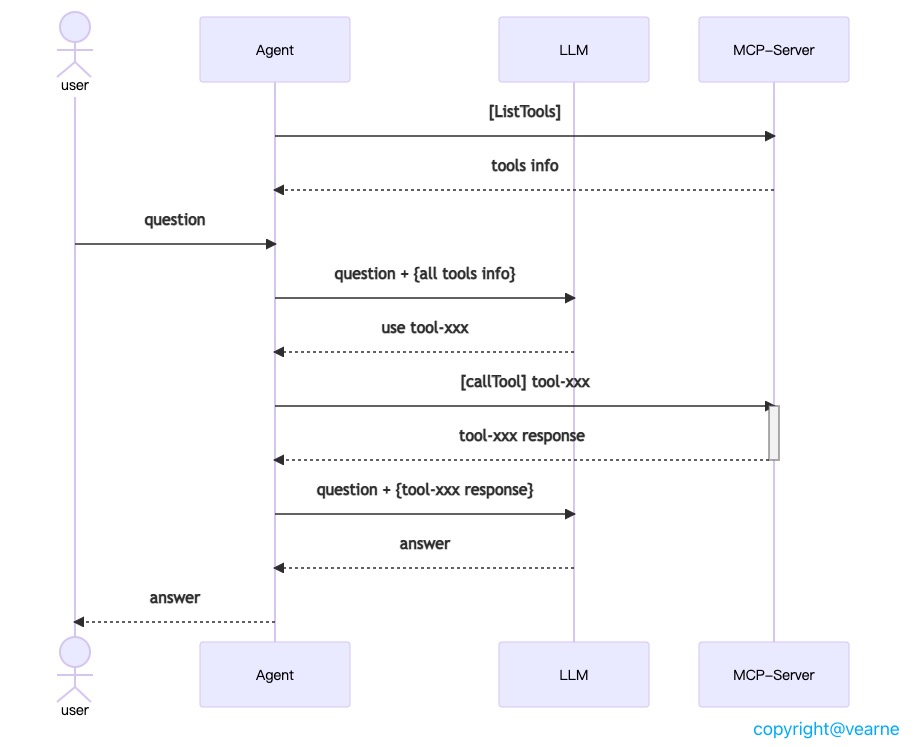
我整理了一张完整的时序图,对交互逻辑有不明白的地方,可以好好看看这张图。
6. 总结
得益于MCP提供的能力加持,AI agent的能力有了极大的提高,不久可能将会迎来量到质的飞跃。
参考资料
1.MCP-architecture 2.MCP-transports
作者: vearne 文章标题: 玩转MCP(2)-原理篇 发表时间: 2025年8月5日 文章链接: https://vearne.cc/archives/40297 版权说明: CC BY-NC-ND 4.0 DEED